
Standard texting apps and personal phones have no practice-level access controls or audit trail.
HIPAA-Compliant Messaging
HIPAA-Compliant Messaging Patients Actually Answer.
Smile Virtual gives your practice HIPAA-compliant messaging for every conversation, from smile photos and video consults to treatment questions and appointment details, all in one secure inbox.
What We Hear From Dentists
Patient Photos Shouldn't Live in Someone's Camera Roll.
A patient sends a smile photo to the office cell. A coordinator forwards it from her personal email so the doctor can see it. It's fast and well-meant, and it leaves protected health information scattered across devices and accounts your practice doesn't control. When a phone is lost or a team member leaves, so does the record.
Conversations split across phones, inboxes, and voicemail, so no one sees the full history.
Can I just send you my photos?
With HIPAA-compliant messaging, the answer is yes, without the risk.
How It Works
Secure Patient Messaging Without Extra Steps.
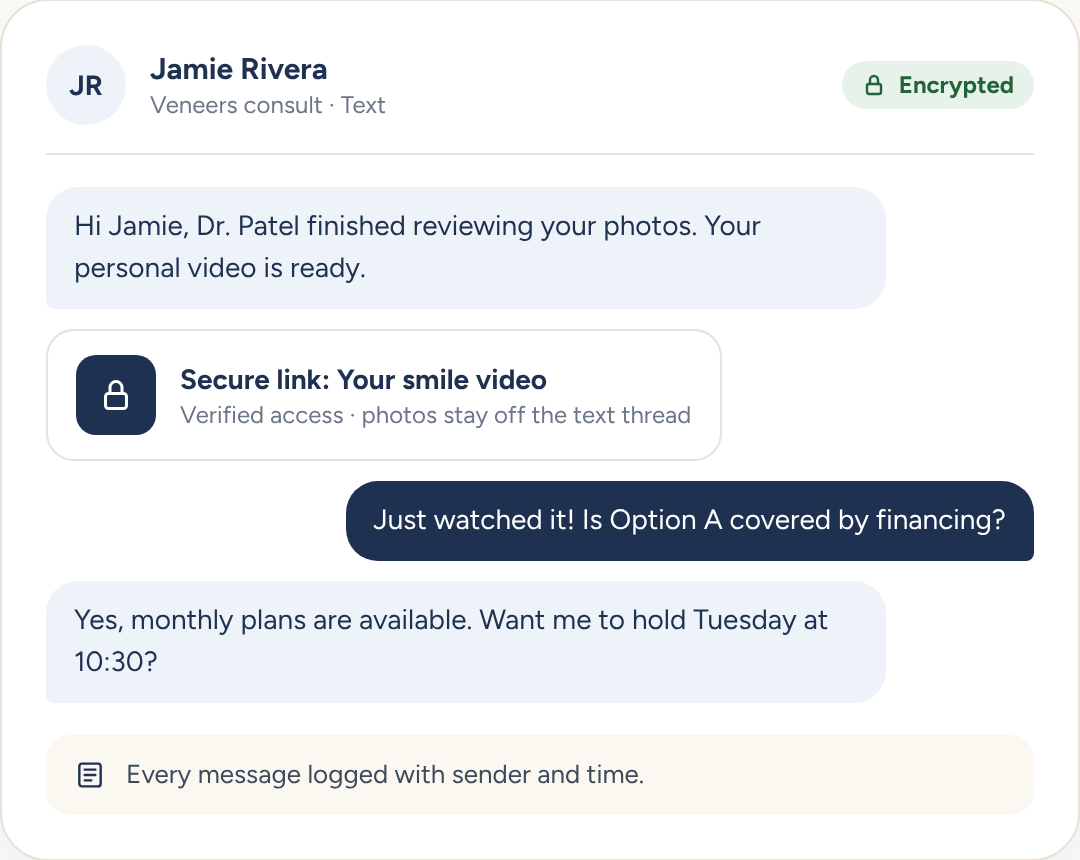
Patients text and email the way they always do. Sensitive content stays protected behind the scenes.
#1
Message From One Inbox
Your team texts and emails patients from Smile Virtual using your practice number and address, never a personal phone.
#2
Share PHI Behind a Secure Link
Photos, videos, and treatment plans are delivered through encrypted links, so sensitive details never sit in a text thread.
#3
Encryption
Messages and files are encrypted in transit and at rest.
What You Get
Security Your Team Doesn't Have to Think About.
HIPAA-compliant messaging works best when protection is automatic, not another checklist for the front desk.
Role-Based Access
Control which team members can view, send, and export patient conversations.
Verified Secure Links
Patients confirm their identity before opening photos, videos, or treatment plans.
Patient Consent & Opt-Out
Record texting consent and honor opt-outs automatically across every message.
Meet Patients Where They Are
Reach patients with secure messages and videos they can open on their own time, so conversations keep moving.
No PHI on Personal Devices
Patient photos and treatment details stay in a secure system your practice controls.
Every Conversation in One Place
Anyone on your team can pick up a thread with full context, even after staff changes.
FAQs
HIPAA-Compliant Messaging FAQs
What is HIPAA-compliant messaging?
HIPAA-compliant messaging lets a dental practice communicate with patients about their care, including photos, treatment details, and appointments, through a system that protects patient health information with encryption, access controls, and audit logs.
Do you sign a BAA?
Yes. A Business Associate Agreement is included with every Smile Virtual account at no extra charge, signed during onboarding on day one.
Can patients still text and email the way they already do?
Yes. Patients text and email like normal. Anything that includes PHI, like photos or treatment plans, is delivered through a secure link your team sends from the Smile Virtual inbox, not from a personal phone.
How is PHI protected?
All messages and files are encrypted in transit and at rest. Secure links verify patient identity before opening, role-based access controls who on your team can see what, and every action is logged for audit.
What happens to PHI if a team member leaves?
Nothing walks out the door. Patient photos, videos, and threads live in Smile Virtual, not on personal phones or inboxes. Revoke access for the departing team member in one click and the full history stays with the practice.
How does Smile Virtual integrate with my practice?
Smile Virtual sits in front of your practice management system and hands off booked patients. It integrates with Dentrix, Eaglesoft, Open Dental, Curve, and Denticon.
How long does setup take?
About 15 minutes. Your Success Coach walks you through it on day one, and you can start sending secure messages immediately after.
What does it cost?
Plans start at $399 per month with unlimited consultations, a signed BAA, and no long-term contract required. See the pricing page for the full breakdown.
Ready for HIPAA-Compliant Messaging?
Book a walkthrough and see how secure patient messaging fits into your practice.


