
Big decisions rarely happen in the chair. Patients need time, and they need something to come back to.
Dental Case Acceptance Software
Dental Case Acceptance Starts With a Treatment Plan They Can Rewatch.
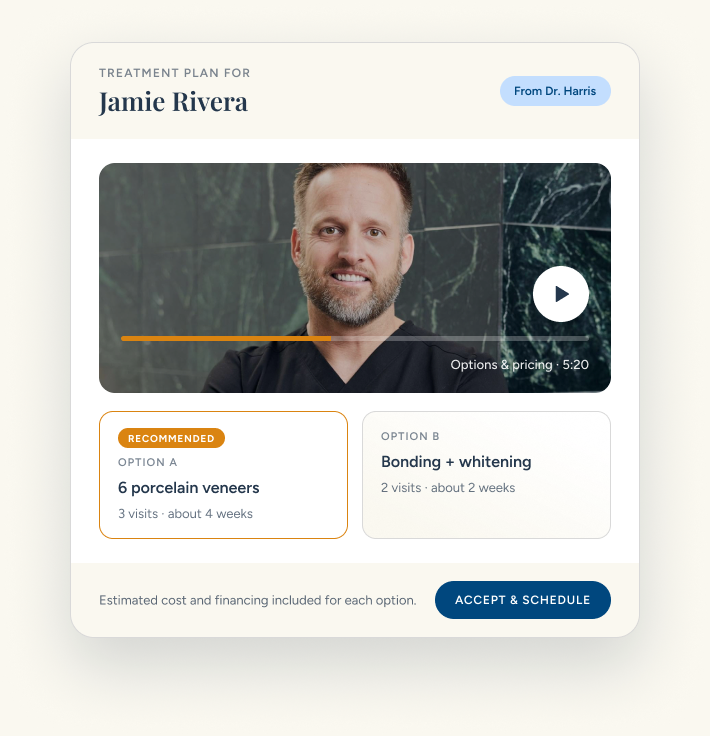
Most dental treatment plans are explained once, chairside, and forgotten by the time the patient reaches the car. Smile Virtual turns every treatment plan presentation into a personal video your patient can rewatch at home, share with their partner, and accept when they're ready.
What We Hear From Dentists
A Great Treatment Plan Loses to a Foggy Memory.
You present the dental treatment plan in the chair, with a bib on and a lot to take in. The patient nods, says they'll think about it, and goes home with a printout full of codes. When their partner asks what it's for and why it costs that much, they can't explain it. The plan stalls in your unscheduled treatment list.
Spouses and family members weigh in on large cases, and they only hear a secondhand version of your plan.
What was that treatment for again?
A video treatment plan presentation answers that question in your voice, as many times as the patient needs.
How It Works
A Better Treatment Plan Presentation in Three Steps.
Build the plan once, present it on video, and let the patient decide with everything in front of them.
#1
Build the Treatment Plan
Add the patient's photos, list two or three treatment options, and attach estimated costs and financing. Saved templates make common cases fast.
#2
Record Your Presentation
Walk through what you see, what you recommend, and why, in about 10 minutes. It's your chairside conversation, without the chair.
#3
Patient Reviews & Accepts
They watch at home, share the link with family, and schedule the option they choose. Your team sees when the plan is opened.
What You Get
Everything a Patient Needs to Say Yes.
A strong dentistry patient presentation answers the questions patients are too polite to ask in the chair: what's wrong, what are my options, what will it cost, and what happens next.
Their Goals, in Their Words
Open with what the patient told you they want. It shows you listened.
What You Observed
Point to their own photos so the diagnosis is concrete, not clinical jargon.
Treatment Options Side by Side
Two or three paths with visits, timing, and your recommendation clearly marked.
Cost Estimates & Financing
An estimated cost for each option, with payment options, so price isn't a surprise later.
Before & After Examples
Show similar cases from your practice so patients can picture the result.
One Clear Next Step
End with a single button to accept and schedule. No phone call required.
What You Get
What You Get
Outcome
Cosmetic Smile Makeovers
Veneers, bonding, and whitening plans where the patient needs to picture the result.
Outcome
Implants & Restorative
High-value cases with multiple phases, where a clear timeline builds confidence.
Outcome
Invisalign & Orthodontics
Explain aligner options, treatment length, and monthly payments in one place.
Outcome
Full-Mouth Rehabilitation
Break complex plans into phases patients can follow and budget for.
FAQs
Treatment Plan Presentation FAQs
What is dental case acceptance?
Dental case acceptance is the share of presented treatment that patients actually accept and schedule. The industry average sits in the 30 to 40 percent range for high-value cases. Practices that present on video with Smile Virtual run an 87% case acceptance rate because the patient has seen the options, the estimated cost, and the dentist's recommendation at home, with their spouse, before they are asked to say yes.
How do you increase dental case acceptance?
Three moves do most of the work. First, present the plan on video so the patient can rewatch and share it with whoever helps them decide. Second, show two or three options side by side with estimated cost and financing, instead of one take-it-or-leave-it number. Third, end with a single accept-and-schedule button so the yes does not stall on a phone tag cycle. That is the playbook built into every Smile Virtual presentation.
How do you calculate case acceptance rate?
Case acceptance rate is accepted dollars divided by presented dollars over a set window, usually a month. If you presented $200,000 in treatment and $87,000 was accepted, the case acceptance rate is 43.5%. Smile Virtual reports this by provider, by procedure category, and by lead source, so you can see where the yes is already happening and where a video presentation would move the needle.
What is a video treatment plan presentation?
A dental treatment plan presentation is how a dentist explains a patient's diagnosis, treatment options, cost, and next steps. With Smile Virtual it becomes a personalized video the patient can watch, rewatch, and share at home.
How long does it take to build and record a plan?
Most plans take about 10 minutes end to end. Saved templates, option libraries, and financing snippets keep the clinical thinking in the video and the busywork out of it.
Can patients accept and schedule straight from the video?
Yes. Every presentation ends with a single accept-and-schedule button. The patient picks their option, lands on your calendar, and your team is notified the moment a plan is accepted.
Can the patient share it with a spouse or family member?
Yes. The link can be forwarded to a spouse, parent, or anyone else helping decide. Every viewer sees the same case, the same options, and the same estimated cost, so nothing gets lost in translation.
Does it work for Invisalign, implants, and full-mouth cases?
Yes. Templates are tuned for veneers, implants, Invisalign, crowns and bridges, and full-mouth rehab. Multi-phase cases can be broken into steps the patient can follow and budget for.
How does Smile Virtual integrate with my practice management system?
Smile Virtual sits in front of your PMS and hands off booked patients. It integrates with Dentrix, Eaglesoft, Open Dental, Curve, and Denticon, so accepted plans flow into the system your team already uses.
How long does setup take?
About 15 minutes. Your Success Coach walks you through it on day one and helps you record your first treatment plan presentation together.
What does it cost?
Plans start at $399 per month with unlimited consultations and treatment plan presentations, a signed BAA, and no long-term contract required. See the pricing page for the full breakdown.
Ready to Present Treatment Plans Patients Accept?
Book a walkthrough and we'll build your first treatment plan presentation together.


