
Patients notice when response times, messaging, and follow-up vary from one location to the next.
Multi-Location Support
One Platform for Every Location in Your Dental Group.
Growing from one office to five shouldn't mean five different ways of handling consults. Smile Virtual gives multi-location dental practices and DSOs one system: each office runs its own inbox and team, and leadership sees every location, every request, and every booking in one place.
What We Hear From Dentists
Every Location Does It Differently. Nobody Sees the Whole Picture.
One office answers leads in an hour. Another takes three days. One uses a shared inbox, another uses the front desk cell phone. When patients get a different experience at every location and leadership can't compare results, growth makes things harder instead of better.
Requests land in a shared inbox and wait while someone figures out which office should take them.
Which of our offices is actually converting?
Multi-location support gives you that answer for every office, side by side.
How It Works
Local Teams Run Their Office. Leadership Sees Them All.
Set up your group once, then add locations as you grow.
#1
Add Each Location
Every office gets its own inbox, providers, booking link, and contact details, under one group account.
#2
Route Requests Automatically
Consult requests go straight to the right office based on the page the patient used or the location they choose.
#3
Compare & Coach
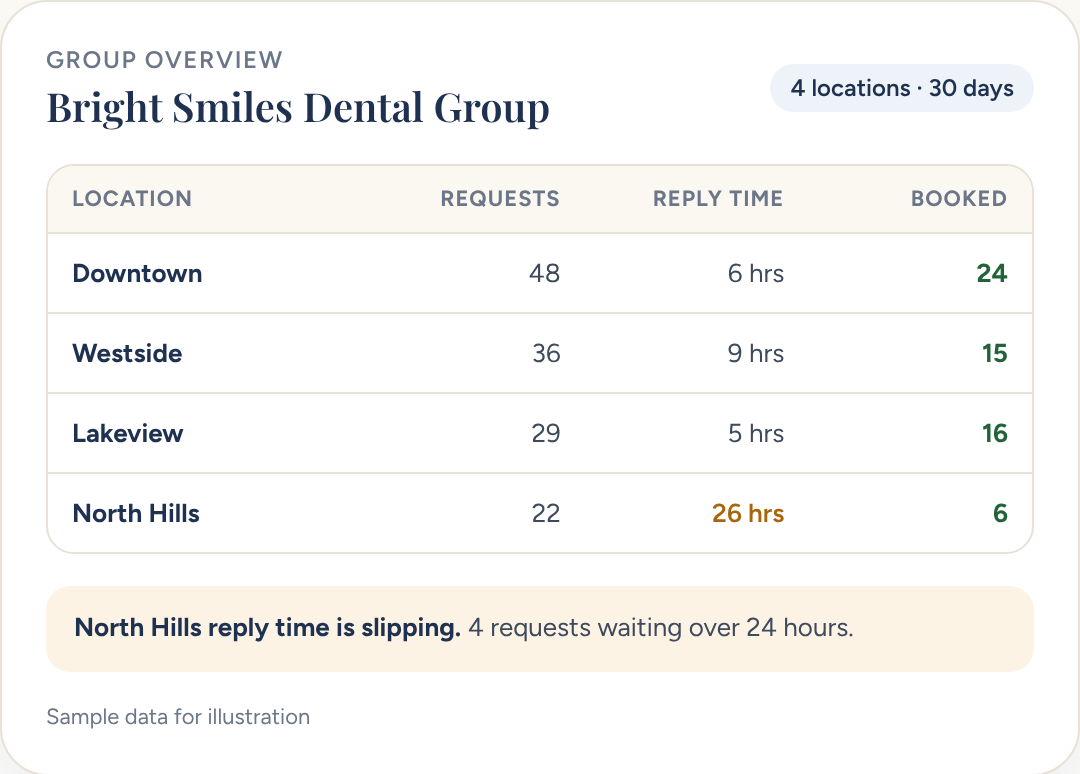
See requests, reply times, and bookings for every location side by side, and spot which offices need support.
What You Get
Everything a Multi-Location Practice Needs.
Local flexibility where it helps, group-wide consistency where it matters.
Separate Inboxes per Office
Each team sees only its own patients, so nothing gets lost in a shared queue.
Group & Location Roles
Give regional managers access to several offices and local teams access to their own.
Shared Templates
Roll out video scripts, treatment plan templates, and follow-up sequences to every office at once.
Consistent Branding
Keep group branding everywhere, with local doctor photos and office details where they belong.
Cross-Location Reporting
Compare each office's requests, reply times, and bookings, or roll everything up for the group.
Easy to Add New Offices
Opening or acquiring a location? Add it to your group with your templates already in place.
What You Get
Grow Your Group Without Losing Control.
Outcome
Every Office Meets the Same Standard
Patients get the same fast, personal video consult no matter which location they contact.
Outcome
Know Which Offices Need Help
Side-by-side numbers make it easy to recognize top performers and support offices that are falling behind.
Outcome
Launch New Locations Ready to Convert
New offices start with your proven templates and workflows from day one.
Outcome
Less Software Sprawl
Replace a patchwork of inboxes, phones, and spreadsheets with one platform for the whole group.
FAQs
Multi-Location FAQs
What is multi-location support in Smile Virtual?
Each location gets its own inbox, team, booking link, and local branding, while regional managers and group leaders see every office from one account. Templates, sequences, and reporting roll up across the group.
How are consult requests routed to the right office?
Requests go to the right inbox based on the page or widget the patient used, the location they picked, or a routing rule you set. No manual triage, no shared queue.
Can regional managers see multiple offices without seeing them all?
Yes. Role-based access lets you give a regional manager three or four offices, a local office manager their single location, and group leadership the whole account. Permissions scope what each user can view, edit, and export.
Can we compare performance across locations?
Yes. Cross-location reporting puts requests, response times, bookings, show rates, and treatment acceptance side by side, so you can see which offices are leading and which need coaching.
How fast can we add a new location?
A new office goes live the same day. Your templates, follow-up sequences, and branding copy over so the location is ready to send consults from day one.
How does Smile Virtual integrate with my practice management system?
Smile Virtual sits in front of your PMS and hands off booked patients to each location's existing system. It integrates with Dentrix, Eaglesoft, Open Dental, Curve, and Denticon, so each office keeps its own PMS without changing workflow.
How long does setup take for a group?
About 15 minutes per location. Your Success Coach walks you through the first office on day one, then clones the setup across the rest of the group.
What does it cost for multiple locations?
Plans start at $399 per month per location with unlimited consultations, a signed BAA, and no long-term contract. Group pricing is available for DSOs and multi-site practices. See the pricing page for the full breakdown.
Ready to Bring Your Locations Together?
Book a walkthrough and see how Smile Virtual supports dental groups and multi-location practices.


